In certain situations I would like to use the software ImageJ (or FIJI) to see an Numpy array, which is dumped in the binary format as an NPY file. This post talkes about the correct way to import these files.
TL;DR: 1) use File > Import > Raw to open the NPY file; 2) The order of axes is reversed; 3) set Offset to first Image to 128.
NPY file = Header + Bianry Data
A numpy array can be easily saved to the disk with numpy.save function, and the result is typically shown as a NPY file. The file is copmosed of,
- header: some meaningful information about the array.
- raw data:
010111...bits that representing the values in the array.
We need to ignore the header in ImageJ or FIJI, and load the raw data.
Loading the NPY File
We can use File → Import → Raw… to load the raw data in the NPY file.
After selecting the file, the following window will appear.
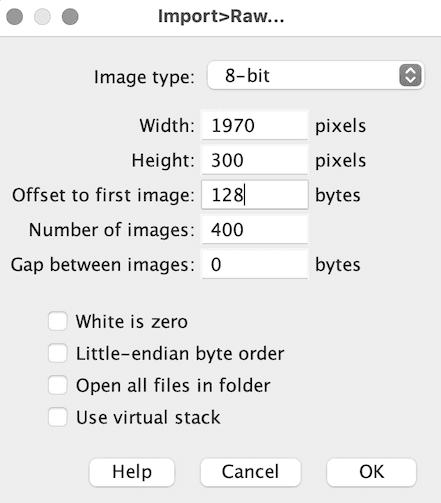
And unfortunately you need to input correct numbers to load the data to ImageJ/FIJI.
In the example shown in the image, the .npy file contains an array with shape (400, 300, 1970) and a data type of numpy.uint8. Therefore, I select 8-bit, and all the values for width, height, and number of images. Notice because the numpy and ImageJ/FIJI use a different order to store the array, the (X, Y, Z) array in numpy should be loaded as (Z, Y, X) in ImageJ/FIJI.
The value Offset to first image is tricky: we need the header length of the NPY file. Luckly, it is a number that is divisible by 16 (32, 64, 96, 128, …). And in most cases, it was 128. And if 128 does not work, you can make more “educated guesses”. I will make sense of the number in the next section.
Nevertheless, if you type everything correctly and click OK, the data will be loaded into ImageJ/FIJI as stacks of 2D images!
The header length
We need to put the length of the header to Offset to first image. Firstly, we can “see” the header information with a hex editor. The following information shows the binary file of a dumped 3D array.
934E554D 50590100 76007B27 64657363 72273A20 277C7531 272C2027 | "NUMPY  v {'descr': '|u1',
666F7274 72616E5F 6F726465 72273A20 46616C73 652C2027 73686170 |'fortran_order': False,
65273A20 28343530 2C203330 302C2031 39373029 2C207D20 20202020 | 'shape': (450, 300, 1970), }
20202020 20202020 20202020 20202020 20202020 20202020 20202020 |
20202020 20202020 20202020 2020200A <- end of header           |
00010000 00000000 00000000 01010202 01000000 01000001 01020202 |
01010101 01010100 00020102 02010000 02030100 00000001 02000000 |
00000001 00010102 01000001 02040002 00010204 02000102 04070403 |
01020400 00000000 00010002 02020201 00000000 00000000 00000000 |
00000000 02020000 01000000 00000001 00000000 00020000 00000000 |
...
There are some rules about the headers, notably
- A valid .npy file always start with
0x93 - After
0x93is the ASCII values ofNUMPY, being0x4e(N),0x55(U),0x4d(M),0x50(P),0x59(Y). (BTW, you can check the hex value of a letter in python usinghex(ord("N"))) - The 7th and 8th bytes gives information about versions. (
0x0100) - The 9th and 10th bytes gives the header size (called HEADER_LEN in numpy documentation).
(In my example, it was
0x7600, converting to integer is 118.) - The actual header length is HEADER_LEN + 6 (0x93+NUMPY) + 2 (
0x0100) + 2 (0x7600). The length should always be divisible by 16. (In my example, the header length is 118 + 10 = 128)
It was very confusing from the documentation, since HEADER_LEN + 10 is the actual header length.
Dump Array without Header
If the header length is frustrating for you, another option would be use the tofile method of the numpy array, to just dump the data to a file. For example, the following code dumps a 3D array without header.
import numpy as np

data = np.ones((5, 100, 200), dtype=np.uint8)
data.tofile("data.raw")
And the data.raw file can be loaded with following settings.
- Image type: 8-bit
- Width: 200
- Height: 100
- Offset to first Image: 0
- Number of Images: 5
- Gap between Images: 0
The bad part of the tofile method is actually the lack of the header, and you will need the memorise the shape and dtype of the array to make the raw file useful.